itmc-business-os
Full Project Guide — ITMC Bussines OS
This is the single comprehensive reference for this project: what it is, how
it’s built, how to run/test/publish it, and — since this repo is meant to be
reused as a starting point for future projects — exactly what to change to
adapt it into a brand-new app. Shorter, task-focused docs also exist (see
docs/README.md for the full index — GETTING_STARTED.md,
RUNNING.md, PUBLISHING.md, FASTLANE.md, play-console-manual-steps.md,
store-listing-answers.md); this doc ties everything together in one place
and adds the “reuse this as a template” and “lessons learned” material that
doesn’t belong in a quick-start.
Table of contents
- What this is
- Architecture
- Folder structure / file manifest
- Environment setup
- Running & testing
- Branching & CI
- Publishing to Google Play
- Reusing this repo as a template for a new project
- Lessons learned / troubleshooting
1. What this is
A local-first Flutter app (ITMC Bussines OS, Dart package name
itmc_estimator) for a software/development service business: manage
clients, a reusable service-price catalog, cost estimates, and invoices,
with PDF export. No login, no backend — everything lives on-device.
Beyond the app itself, this repo is a working example of a fully automated Google Play release pipeline: tag a version, and CI builds, signs, and uploads the binary plus the entire store listing (text, icon, feature graphic, screenshots) with zero manual Play Console form-filling for anything recurring.
2. Architecture
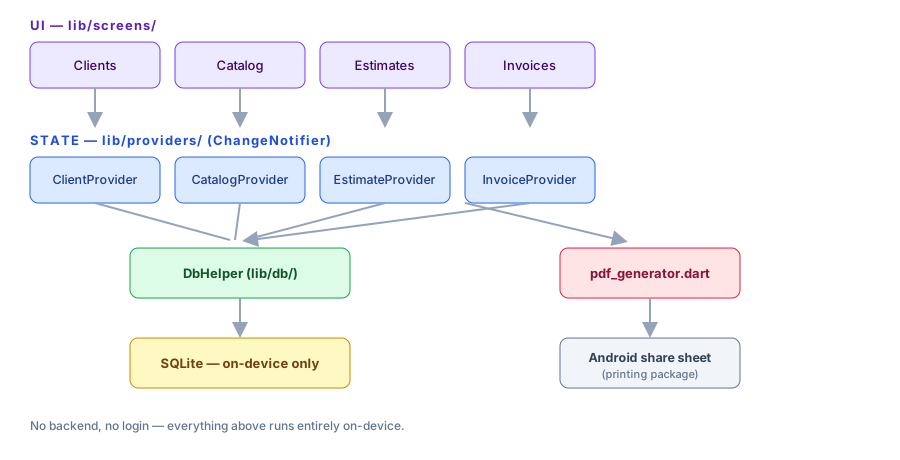
lib/screens/— UI, one folder per feature area (clients, catalog, estimates, invoices), each with a list screen + form screen (+ detail screen for estimates/invoices).lib/providers/— oneChangeNotifierper entity, wrappingDbHelper. Screens read/write through these via theproviderpackage; no screen talks to the database directly.lib/db/db_helper.dart— asqflitesingleton: schema + CRUD for all 4 tables (clients, service_catalog, estimates, invoices). Estimates/ invoices store their line items as a JSON column rather than a separate table — simpler for this scale, revisit if line items ever need independent querying.lib/pdf/pdf_generator.dart— pure function, bytes in (estimate/ invoice + client) → bytes out (PDF). Screens callPrinting.sharePdfwith those bytes to hand off to Android’s native share sheet.lib/models/— plain Dart classes, no codegen.toMap/fromMapfor direct-column models (Client),toJson/fromJsonfor the embedded line-items list.
3. Folder structure / file manifest
lib/                          The app itself (see architecture above)
android/                      Flutter's generated Android project
  app/build.gradle.kts        Signing config reads android/key.properties (git-ignored)
  key.properties.example      Template — copy to key.properties, fill in real values
fastlane/
  Appfile                     package_name + json_key_file path
  Fastfile                    Lanes: build_release, screenshots, deploy_internal, deploy_production
  metadata/android/en-US/     Store listing text, changelog, icon/feature graphic, screenshots
                              — this whole folder is what gets pushed to Play Console automatically
  play-service-account.json   Google Cloud service account key (git-ignored, not in repo)
scripts/
  capture_screenshots.sh      Auto-captures Play Store screenshots via adb (no manual screenshotting)
  generate_placeholder_graphics.ps1   Generates a placeholder icon/feature graphic
.github/workflows/
  ci.yml                      Lint/test/build gate — runs on push to dev, PRs into main
  release.yml                 Build+sign+upload — runs on version tags (any branch), or manual dispatch
Dockerfile                    Reproducible release-build image (not needed for day-to-day dev)
docs/
  README.md                   Index of all docs, ordered by when you'd reach for them
  FULL_GUIDE.md               This file
  GETTING_STARTED.md          Quick-start checklist, phase by phase
  RUNNING.md                  Local dev/test setup, golden-path test script
  PUBLISHING.md               One-time Play Console/Cloud setup, in detail
  FASTLANE.md                 What Fastlane is, the lanes in this repo, how to run one locally
  play-console-manual-steps.md  Click-by-click Play Console UI walkthrough (testers,
                              countries, content rating, release, submit for review)
  store-listing-answers.md    Exact answers for the content-rating + data-safety forms
  privacy-policy.md           Hosted live via GitHub Pages, linked from the Play listing
  images/                     Diagrams and reference screenshots for these guides
legacy-appcreator24/          The original AppCreator24-built .aab, kept for reference only
4. Environment setup
See GETTING_STARTED.md, Phase 1
for the from-scratch checklist (Flutter SDK, Android SDK, one emulator).
Once flutter doctor reports clean, you’re ready for everything else in
this doc.
5. Running & testing
flutter pub get
flutter run
Requires an Android emulator or physical device — this app can’t run
correctly on Windows desktop or web targets, because sqflite (local
storage) has no real implementation there. Full golden-path manual test
script → RUNNING.md.
Real screenshot from this app running on the emulator during development:

6. Branching & CI
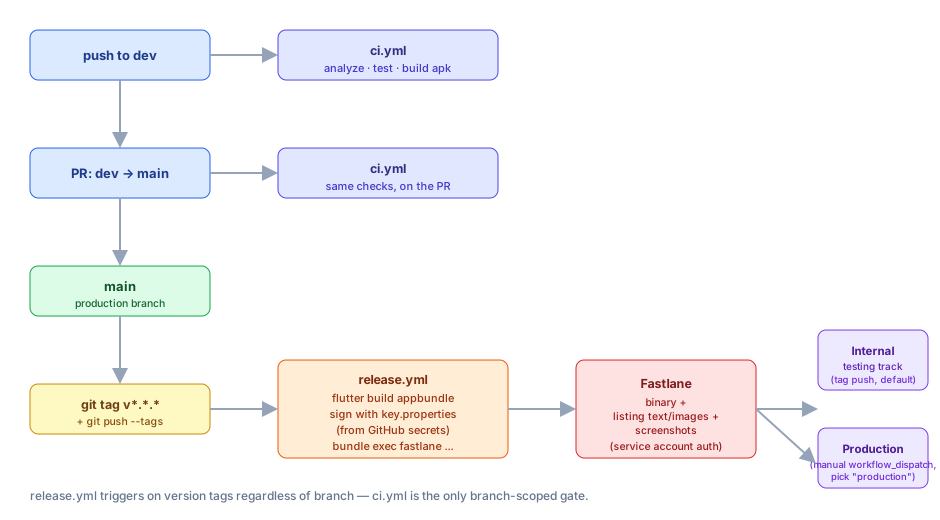
main— production. Only receives merges (via PR) and release tags.dev— where ongoing work happens. Push here for day-to-day changes.ci.yml— runsflutter analyze/flutter test/flutter build apk --debugon every push todevand every PR intomain. This is a quality gate, separate from publishing.release.yml— runs on any push of av*.*.*tag (regardless of branch), or manually via GitHub → Actions → “Release to Google Play” → “Run workflow” (lets you pick internal or production track directly).
Normal flow: work on dev → PR into main → CI passes → merge → tag a
release from main.
7. Publishing to Google Play
Full one-time setup and the ongoing release command are in PUBLISHING.md. Short version: after the one-time setup (Play Console app creation, signing key, Google Cloud service account, GitHub secrets), every release is:
git tag v1.0.1 && git push origin v1.0.1
Content rating questionnaire and data safety form answers (both one-time, manual — no API exists for either) → store-listing-answers.md. Exact click path through every Play Console screen involved (testers, countries/regions, content rating, target audience, data safety, ads, health apps, creating the production release, submitting for review) → play-console-manual-steps.md.
8. Reusing this repo as a template for a new project
Everything below is what to change when starting a genuinely new app from this boilerplate — not just renaming this one, but adapting the whole pipeline for a different app entirely.
8.1 Code identity
pubspec.yaml→name:(Dart package name, snake_case)android/app/build.gradle.kts→namespaceandapplicationId(reverse-domain, e.g.com.itmc.new_app_name) — or just re-runflutter create --project-name <name> --org <org> .fresh and re-apply theandroid/app/build.gradle.ktssigning-config changes from this repo (seegit log -- android/app/build.gradle.ktshere for exactly what to port over)android/app/src/main/AndroidManifest.xml→android:label(the user-visible app name)lib/main.dart→MaterialApp(title: ...)- Replace
lib/models/,lib/db/,lib/providers/,lib/screens/,lib/pdf/with the new app’s actual features — the pattern (models → DbHelper → providers → screens, pure-function PDF generation) is what’s reusable, not the specific Client/Estimate/Invoice content
8.2 App icon & branding
- Put real artwork at
assets/icon/icon.png, rundart run flutter_launcher_icons(already configured inpubspec.yaml) - Regenerate or replace
fastlane/metadata/android/en-US/images/icon.pngandfeatureGraphic.png(placeholders come fromscripts/generate_placeholder_graphics.ps1— edit the text/colors in that script for a quick placeholder, or drop in real designed assets) - Update
scripts/capture_screenshots.sh’s default package name argument to match the newapplicationId
8.3 Store listing content
fastlane/metadata/android/en-US/title.txt,short_description.txt,full_description.txtfastlane/metadata/android/en-US/changelogs/<versionCode>.txtdocs/privacy-policy.md— rewrite to reflect what the new app actually does. Don’t reuse this app’s “we collect nothing” policy if the new app has a backend, accounts, or analytics — that would be a false legal declaration.fastlane/Appfile→package_name(...)must match the newapplicationIdexactly
8.4 Signing & credentials (never share these across apps)
- Generate a new, separate signing keystore for the new app — never reuse an existing app’s upload key for an unrelated app
- Create a new Google Cloud project (or a new service account within an existing one) for the new app’s Play Developer API access — see the full walkthrough in PUBLISHING.md, step 4
- Create the new app in Play Console with its own package name — copy-paste it, don’t retype it (see §9 for why this matters so much)
- Set the same 5 GitHub secrets on the new repo (they’re per-repo,
never shared):
ANDROID_KEYSTORE_BASE64,ANDROID_KEYSTORE_PASSWORD,ANDROID_KEY_ALIAS,ANDROID_KEY_PASSWORD,PLAY_SERVICE_ACCOUNT_JSON - Enable GitHub Pages on the new repo (Settings → Pages → branch
main, folder/docs) for the new privacy policy URL
8.5 Repo setup
- Create the new repo,
git init, push - Create
devbranch, open the initial PR-based workflow (see §6) - Re-run through GETTING_STARTED.md top to bottom for the new app, phase by phase — it’s already written generically enough to reuse directly, just double-check each phase’s specifics match the new app
9. Lessons learned / troubleshooting
Real issues hit while building this pipeline, so a future project built from this template doesn’t have to rediscover them:
-
Google Play package names are permanent. The instant an app is created in Play Console, its package name can never be changed. We hit this directly: a typo (
com.itmc.itmc_estimato, missing the final “r”) meant the whole app had to be deleted and recreated rather than fixed. Always copy-paste the package name; never retype it. -
Gradle’s
file()inandroid/app/build.gradle.ktsresolves relative paths againstandroid/app/, not the project root. A CI step that decodes the signing keystore needs to write it toandroid/app/specifically, or the build fails with “Keystore file … not found” even though the file exists somewhere else in the repo. -
Fastlane’s working directory during lane execution isn’t something to guess at. Relative paths (
"../build/...") that happened to work interactively broke in CI. Fix: anchor every path in theFastfileto an absolute location viaFile.expand_path("..", __dir__), never assume a particularDir.pwd. -
Google restructured Play Console’s API access flow and removed the separate “link a Google Cloud project” page entirely. Service accounts now get access the same way a human teammate would: Play Console → “Users and permissions” → “Invite new users” → paste the service account’s email. If a guide (including an older version of this one) mentions a standalone “API access” page, it’s outdated.
-
GitHub Actions redacts every occurrence of a secret’s literal value anywhere in log output — including inside unrelated words. Since one of our secrets’ value was literally
upload, log lines likeupload_to_play_storerendered as***_to_play_store. Cosmetic only, not a real error — but confusing if you don’t know it’s happening. -
Antivirus HTTPS-scanning (e.g. Avast) can break Gradle’s dependency downloads on Windows, because the JVM doesn’t automatically trust what’s in the OS certificate store. Fix it in your own
~/.gradle/gradle.properties(a per-machine file, never commit this workaround into a shared project’sandroid/gradle.properties— it won’t exist on anyone else’s machine or in CI). -
A pasted/attached chat image isn’t automatically a file on disk. If an AI assistant needs to use an image you’ve shared (e.g. an app icon), it may need you to save it to an actual path it can read, rather than just “seeing” it in the conversation.
-
Scoping the service account to “testing tracks only” at setup, meaning to widen it later, silently breaks the first production deploy. The build succeeds, every metadata/image upload succeeds, and only the very last API call — committing the release to the production track — fails with
Google Api Error: Invalid request - The caller does not have
permission
. It reads exactly like a pipeline bug. Grant full release permission (or at least testing and production) in Play Console → Users and permissions the first time, not “once we’re ready to automate production.” -
The Fastlane store listing icon and the real installed app icon (
android/app/src/main/res/mipmap-*/ic_launcher.png) are two completely independent files that nothing keeps in sync automatically. This project shipped a real designed icon to the store listing while the actual installed app still used the stock Flutter logo, becauseflutter_launcher_icons’s source file (assets/icon/icon.png) was configured but never actually created/committed — so the generator was never run. Google’s automated review caught it and rejected the release for a Misleading Claims violation (“app icon or name differs from your store listing”). Fix: use the exact same source image for both, and re-rundart run flutter_launcher_iconsevery time it changes — see DEPLOY_TEMPLATE.md §B.6.